







The best LogRocket alternatives & competitors, compared


Contents
LogRocket combines session replay, front-end error monitoring, and basic product analytics into one tool. It's particularly popular with engineering teams who want to debug issues by replaying sessions alongside console logs, network requests, and Redux state.
But LogRocket isn't right for everyone. Maybe you want more product analytics features, to run experiments and feature flags in the same tool, a more transparent pricing model, or an open source alternative.
This guide compares the best LogRocket alternatives honestly – what they're good at, where they fall short, and who they're actually for.
1. PostHog
- Founded: 2020
- Similar to: LogRocket, Smartlook
- Typical users: Engineers and product teams
- Typical customers: Mid-size B2Bs and startups
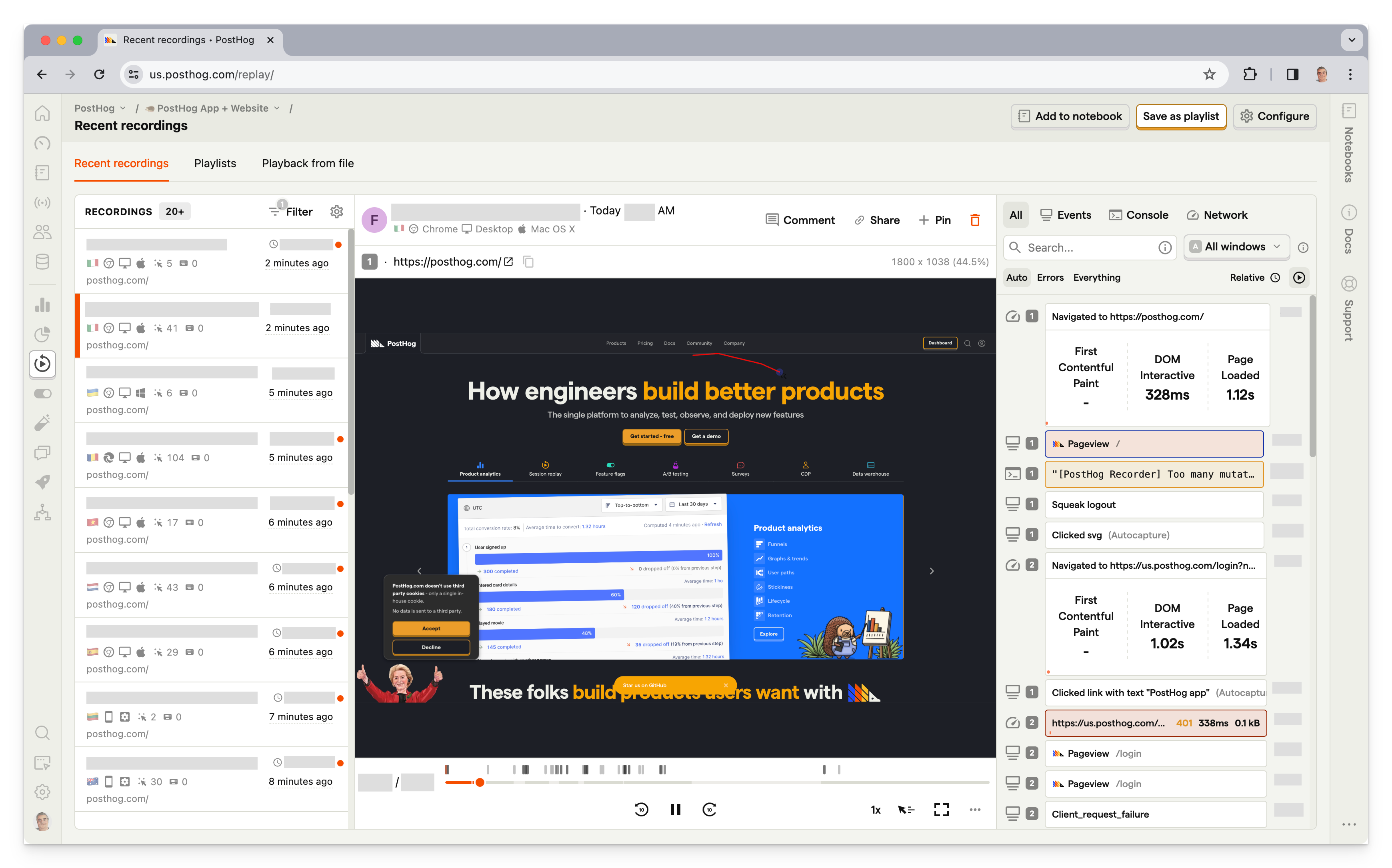
What is PostHog?
PostHog (that's us 👋) is a developer platform combining product analytics, session replay, feature flags, experiments, error tracking, user surveys, and a lot more into one product.
This means it's not just an alternative to LogRocket, but also tools like LaunchDarkly, Sentry, FullStory, and Amplitude.
Typical PostHog users are engineers and product managers at startups and mid-size companies, particularly B2B companies. Customers include Supabase, ElevenLabs, Lovable, and Airbus.
PostHog ships new features constantly and is built to keep up with engineering teams who want their tools to do more over time.
Key features
Session replay: Full DOM replay with event timelines, console logs, network activity, performance metrics, AI session summaries, and 90-day data retention on the pay-as-you-go plan.
Product analytics: Funnels, user paths, retention analysis, custom trends, and dynamic user cohorts. Also supports SQL insights for power users.
Feature flags: Boolean and multivariate flags with local evaluation (for faster performance) and JSON payloads.
Experiments: Up to 19 test variants, primary and secondary metrics. Automatically calculate test duration, sample size, and statistical significance.
Error tracking: Capture exceptions with full stack traces and source maps, linked directly to the session replay of what the user was doing when the error happened.
PostHog AI: Natural language querying as well as an MCP server and CLI for using PostHog from Claude, Cursor, and other AI coding tools.
How does PostHog compare to LogRocket?
PostHog has more tools for shipping new features and understanding their impact, while LogRocket focuses on surfacing issues and errors with your app's experience.
If replay is 90% of your use case and you're primarily debugging front-end issues, LogRocket is worth considering. If you want replay connected to a full product development platform, PostHog is the stronger choice.
Main differences between PostHog and LogRocket
- LogRocket is focused on session replay and front-end monitoring. PostHog covers that plus a full suite of developer tools.
- LogRocket captures Redux/Vuex state alongside replays, which is uniquely useful for debugging React and Vue apps. PostHog doesn't have this yet.
- PostHog is fully open source; LogRocket is proprietary.
- PostHog's free tier covers 5,000 web and 2,500 mobile replays, plus 1M analytics events per month; LogRocket's covers 1,000 replays/mo only (web or mobile).
Main similarities between PostHog and LogRocket
- Both offer session replay with console logs, network monitoring, and performance tracking.
- Both have front-end error tracking with stack traces.
- Both have AI assistants – LogRocket's Galileo proactively surfaces struggle patterns; PostHog AI supports natural language querying and session summaries.
- Both integrate with GitHub, Slack, and popular developer tools.
Why do companies use PostHog?
According to reviews on G2, companies use PostHog because:
It replaces multiple tools: PostHog can replace LogRocket (session replay and analytics), LaunchDarkly (feature flags and A/B testing), and Userpilot (feedback and surveys). This simplifies workflows and ensures all their data is in one place.
Pricing is transparent and scalable: Reviewers appreciate how PostHog's pricing scales as they grow. There's a generous free tier. Companies eligible for PostHog for Startups also get $50k in additional free credits.
They need a complete picture of users: PostHog includes every tool necessary to understand users and improve products. This means creating funnels to track conversion, watching replays to see where users get stuck, testing solutions with A/B tests, and gathering feedback with user surveys.
Bottom line
PostHog is the best LogRocket alternative if you want session replay as part of a broader product development platform. If you primarily want front-end debugging with Redux state capture, LogRocket's replay tooling is more focused.


Install PostHog with one command
Paste this into your terminal and make AI do all the work.

2. Glassbox
- Founded: 2010
- Most similar to: FullStory, PostHog
- Typical users: Business analysts, product support, marketers
- Typical customers: Enterprise B2C companies, retail, and financial services

What is Glassbox?
Glassbox is a session replay and analytics platform with a particular focus on mobile apps and e-commerce use cases. Customers include UK retailer Sainsbury's, Marriott, and Experian.
Glassbox is predominantly used by business analysts and support teams in enterprise B2C companies.
Key features
Session replay: Watch and analyze real user sessions on web and mobile apps.
Product analytics: Understand user paths and struggle points.
Performance analytics: Track app performance and its impact on conversion rates.
Click, scroll, and heatmaps: Understand where users interact with your app.
User feedback: Gather satisfaction and user feedback on the app experience.
Struggle scores: Automatic detection of friction points, errors, and frustration signals.
How does Glassbox compare to LogRocket?
On a feature-by-feature basis, Glassbox and LogRocket are nearly identical. Glassbox even automatically identifies trouble areas in your app, similar to LogRocket's issue monitoring and triaging. The big difference is Glassbox's focus on mobile and lack of error tracking.
Main differences between Glassbox and LogRocket
- Glassbox is built for large retail, financial services, and travel companies – its struggle scores, funnel analysis, and mobile analytics are oriented around conversion and customer journey optimization at scale. LogRocket serves a broader engineering audience across web and mobile apps of all sizes.
- Glassbox is used by business analysts, support, and marketing teams in enterprise B2C companies. LogRocket skews toward engineers and front-end developers.
- Both can get expensive at scale, but LogRocket has a transparent free tier and published pricing. Glassbox is enterprise-only with no published pricing.
Main similarities between Glassbox and LogRocket
- Both offer session replay with automatic frustration signal detection.
- Both have heatmaps and funnel analysis.
- Both automatically surface struggle points and friction without manual session review.
- Both support web and mobile app recording.
Why do companies use Glassbox?
According to G2 reviews, customers use Glassbox for:
Session replay and error analysis: Glassbox is best known for its session replay features, so this is the most popular use case. Customers use Glassbox to analyze user journeys and identify app-breaking bugs.
Heatmap and funnel analysis: Users like the heatmaps feature, which enables them to see user preferences on key pages. They combine this with paths and funnels to see the entire journey.
Fixing low conversion and abandonment: Glassbox is popular among online retailers, who use it to solve issues with conversion and basket abandonment. Their struggle scores are a popular feature for figuring this out.
Bottom line
Glassbox is the closest feature-for-feature alternative to LogRocket with more of a focus on mobile. Glassbox makes sense for large B2C and ecommerce companies looking for similar functionality to LogRocket.
3. Sentry
- Founded: 2012
- Most similar to: LogRocket, Glassbox
- Typical users: Developers, infrastructure teams
- Typical customers: B2C and B2B SaaS software with complicated products.

What is Sentry?
Sentry is an error tracking and application monitoring platform providing tools to help prevent broken code, crashes, and other issues. All the tools engineering teams need to identify bugs, monitor performance, and debug slow queries.
Where LogRocket approaches errors from a UX and session replay perspective, Sentry approaches them from an engineering observability perspective. Sentry also includes session replay, used primarily as a debugging context tool rather than a UX research tool.
Key features
Session replay: See all the details of an issue with context like DOM events, console logs, and network calls.
Tracing: Identify performance issues with an end-to-end distributed trace to see how calls and queries do across the stack.
Error tracking: Capture errors and events leading up to them to make reproduction and fixes simpler.
Performance monitoring: See how your app and queries perform. Find and fix slow areas.
Release tracking: Connect issues to releases. Gives the context to making debugging easier.
How does Sentry compare to LogRocket?
Both Sentry and LogRocket overlap on session replay and front-end error tracking, but Sentry goes much deeper on application-level observability whereas LogRocket goes broader on the UX side.
Main differences between Sentry and LogRocket
- Sentry's error monitoring covers the full stack – source maps, performance profiling, cron monitoring, release tracking, and Autofix AI that suggests code fixes. LogRocket's error tracking is front-end focused and paired with replay.
- LogRocket has heatmaps, product analytics, and session replay built for UX workflows. Sentry has session replay primarily as a debugging context tool – it's not a UX research platform.
- Sentry has a free tier of only 50 replays/month. LogRocket's free tier covers 1,000 sessions/month.
Main similarities between Sentry and LogRocket
- Both detect JavaScript errors with stack traces and source maps.
- Both offer session replay tied to error events for debugging context.
- Both have AI layers – Sentry's Autofix suggests root cause and code fixes; LogRocket's Galileo surfaces user struggle patterns.
- Both integrate with GitHub, Slack, and issue tracking tools.
Why do companies use Sentry?
G2 reviews are big fans of these three benefits of Sentry:
Fix bugs fast: Understand where issues are happening and get the context to solve them fast. Sentry enables developers to figure out what is happening and where.
Auto tracking: Track performance, errors, crashes, and performance automatically. Developers are more confident they understand when errors and performance issues are happening.
Comprehensive: All the tools developers need to debug, find issues, and improve their applications. All this information is invaluable for developers when it comes to building a high-quality app.
Bottom line
Sentry is the better choice if you need deep application error monitoring beyond just front-end JavaScript errors. LogRocket is the better choice if you want UX-focused session replay paired with front-end monitoring. Many teams run both – they cover different parts of the observability stack.
4. FullStory
- Founded: 2012
- Most similar to: PostHog, Glassbox
- Typical users: Product managers, customer success, and support
- Typical customers: Online retailers and SaaS companies

What is FullStory?
FullStory describes itself as Digital Experience Intelligence, which is code for session replay and mobile app analytics, with a side of product analytics. Like LogRocket and PostHog, it supports event autocapture, so you don't have to manually code every event you want to capture.
FullStory is particularly popular with enterprise UX and customer experience teams who need to diagnose friction and share session evidence across product, support, and design.
Key features
Session replay: Watch and analyze real user sessions on web and mobile apps.
Product analytics: Understand user paths and struggle points.
Event autocapture: Tagless event capture that ensures the tracking of all events.
Heatmaps: Find out where users click and frustration points.
Mobile app analytics: Crash analytics and user path analysis.
Guides and Surveys: No-code product tours, onboarding checklists, banners, smart tips, and in-app NPS surveys triggered based on behavioral data.
StoryAI: AI agents that automatically summarize sessions, surface friction points prioritized by conversion impact, and answer behavioral questions in natural language.
How does FullStory compare to LogRocket?
Both FullStory and LogRocket have tools to understand user experience, but LogRocket captures more data on errors and issues.
Main differences between FullStory and LogRocket
- FullStory is built for UX and CX research teams; LogRocket is built for front-end engineers debugging issues.
- FullStory's StoryAI is more mature for research workflows – it summarizes sessions and prioritizes friction by revenue impact. LogRocket's Galileo proactively surfaces user struggle patterns.
- LogRocket has a free tier and transparent published pricing. FullStory has no free plan and requires a sales conversation to get a quote.
Main similarities between FullStory and LogRocket
- Both offer full DOM session replay with autocapture of user interactions.
- Both have heatmaps and frustration signal detection (rage clicks, dead clicks).
- Both have AI layers that automatically surface issues without manual session review.
- Both are primarily web-focused tools with some mobile support.
Why do companies use FullStory?
According to reviews on G2, companies use FullStory for:
Easier collaboration: As an accessible tool for non-technical users, FullStory facilitates collaboration between product, UX, and engineering teams by allowing all teams to access useful, reliable data.
Viewing user issues: Support teams use FullStory to replay sessions to understand user hard-to-replicate problems, and identify bugs that need fixing.
Improving conversion: FullStory users like to combine funnel insights with replays of user sessions to understand pain points and improve conversion.
Bottom line
FullStory is a mature product with many of the same features as LogRocket. It's great for ecommerce companies who care less about the error tracking depth of LogRocket.
5. Pendo
- Founded: 2013
- Most similar to: PostHog, Hotjar
- Typical users: Product managers and customer success teams
- Typical customers: Small and mid-market B2C apps

What is Pendo?
Pendo describes itself as a product experience platform. In addition to product analytics, it offers session replay, in-app guides, user feedback, and product validation tools.
Key features
Product analytics: Funnels, trends, and retention analysis with event autocapture.
In-app guides: Deliver personalized guidance to customers, directly inside your app.
User feedback: Capture and analyze customer feedback at scale.
Product validation and roadmaps: Plan your product improvements and roadmap using data from Pendo.
Session replay: Available on higher-tier plans (Core and Ultimate), Pendo's session replay supports web and mobile, includes frustration signal detection, and has no recording caps or data retention limits.
How does Pendo compare to LogRocket?
Pendo focuses more on in-app guides and feedback. It doesn't have the monitoring and error tracking LogRocket has.
Main differences between Pendo and LogRocket
- Pendo's no-code in-app guide builder is its clearest differentiator – tooltips, walkthroughs, and onboarding flows without engineering. LogRocket has nothing like this.
- LogRocket has error tracking, performance monitoring, and Redux state capture. Pendo has none of these.
- Pendo's pricing is enterprise-only and requires a sales conversation. LogRocket has transparent self-serve pricing.
Main similarities between Pendo and LogRocket
- Both offer session replay and product analytics.
- Both support event autocapture.
- Both integrate with Slack, Jira, and popular developer and support tools.
- Both have a free tier for smaller teams or evaluation.
Why do companies use Pendo?
According to G2 reviews, customers use Pendo for:
Customer support and feedback: Users value Pendo as a useful tool for customer support and feedback collection. They use Pendo's feedback features to gather qualitative data and feed that into Pendo's validation and roadmap features.
Improving onboarding: Combining Pendo's in-app guides and analytics features makes it easy for non-technical users to experiment with new onboarding flows, improving user adoption.
Product planning: Customers to use Pendo's data tools, product validation, and roadmap features to align internal teams and stakeholders on product development.
Bottom line
Although both have analytics and session replay, Pendo focuses on in-app guides and feedback. It falls short on the monitoring and error tracking fronts though.
6. Hotjar
- Founded: 2014
- Most similar to: Pendo, Glassbox
- Typical users: Product designers, researchers, and marketers
- Typical customers: Ecommerce and content-driven sites

What is Hotjar?
Hotjar (recently acquired by Contentsquare) focuses on user behavior rather than analytics. This means using heatmaps, replays, feedback, and interviews to understand the qualitative aspects of your site and app.
It's popular with marketing and UX teams who want qualitative insights without the engineering overhead of more technical tools.
Key features
Heatmaps: See what parts of your pages get attention and how far down the page users get.
Recordings: Replay real user sessions and see what they see.
Feedback: Learn what your users are thinking. Find out their likes and dislikes.
Surveys: Ask users questions to hear their opinions on features, flows, and what you should build next.
Interviews: Talk to real users to share ideas, test designs, and get live feedback.
How does Hotjar compare to LogRocket?
LogRocket focuses on analytics and error tracking, while Hotjar focuses on tools for talking to users like feedback, surveys, and interviews.
Main differences between Hotjar and LogRocket
- Hotjar is a qualitative research tool (heatmaps, feedback, surveys, and interviews for marketers and UX researchers). LogRocket is a debugging and monitoring tool (session replay with error tracking, console logs, and performance profiling for engineers).
- LogRocket has error tracking, network monitoring, and Redux capture. Hotjar has none of these – it has no error tracking at all.
- Hotjar's free tier includes 5% sessions captured (up to a max of 10k) whereas LogRocket's free tier includes 1,000 sessions/month.
Main similarities between Hotjar and LogRocket
- Both offer session replay and heatmaps.
- Both are self-serve with free tiers and transparent pricing.
- Both are easy to install – paste a snippet and you're capturing data.
- Both support filtering and searching recordings by user properties or events.
Why do companies use Hotjar?
According to G2 reviews, users are fans of Hotjar because:
Insights on user behavior: Shows what they are doing, where their attention is going, and how they are spending their time. Users love the realizations they get with Hotjar's tools.
Simple for non-technical users: Hotjar is easy to set up and use by non-technical roles like designers, marketers, and product managers. The visuals are easy to use and make data clear.
Heatmaps and scrollmaps: Seeing clicks and how far users scroll down a page works well and creates actionable insights. Helps improve UX and page designs.
Bottom line
Hotjar and LogRocket are on opposite sides of the qualitative vs quantitative analytics spectrum. Hotjar has tools to get qualitative user behavioral insights, while LogRocket focuses on the metrics and issue-driven quantitative ones.
7. Smartlook
- Founded: 2016
- Most similar to: LogRocket, Glassbox
- Typical users: Engineers, business analysts, product managers
- Typical customers: Enterprise retail and ecommerce websites and apps

💡 Good to know: Smartlook is shutting down. It stopped selling new subscriptions on May 31, 2026, and stopped renewals and expansions on August 31, 2026. All paid subscriptions end by August 31, 2027, and the platform closes on September 30, 2027. After a paid subscription ends, existing customers can use the Free plan until the platform closes. See Smartlook's end-of-sale notice for details.
What is Smartlook?
Smartlook is a behavior analytics platform combining session replay, heatmaps, event-based analytics, and crash reports. It was acquired by Cisco in 2023. It has a free tier and was generally positioned as a more accessible, lower-cost alternative to tools like LogRocket and FullStory – particularly for smaller teams and apps.
Key features
Session recordings: Understand how users are actually using your app and where issues occur.
Event-based analytics: See how often users behave in the ways important to you.
Heatmaps: Figure out what parts of the page users click and scroll to.
Funnels and paths: See how users move through your app with custom visuals for key flows.
Crash reports: Learn what happens before a crash without reproduction.
How does Smartlook compare to LogRocket?
Smartlook's combination of session replay and analytics with a focus on issues is very similar to LogRocket. LogRocket has more tools for monitoring and error tracking, however.
Main differences between Smartlook and LogRocket
- Smartlook has stronger cross-platform analytics, tracking users across web and mobile in a single unified view. LogRocket tracks web and mobile separately.
- LogRocket goes deeper on front-end debugging – Redux state capture, network monitoring, and Galileo AI are aimed at engineers diagnosing production issues. Smartlook is more accessible to non-technical users.
- Smartlook's free tier covers 3,000 sessions/month, but it no longer sells paid plans and closes on September 30, 2027. LogRocket's free tier covers 1,000 sessions; paid plans start at $83/month.
Main similarities between Smartlook and LogRocket
- Both offer session replay, heatmaps, and basic funnel analysis in one tool.
- Both support web and mobile app recording.
- Both have crash reporting alongside session replay.
- Both are self-serve with transparent pricing and free tiers.
Why do companies use Smartlook?
According to G2 reviewers, Smartlook users benefit from:
The integration between replays and events: Smartlook connects event-based analytics and sessions. This enables users to dive deeper into user behavior than a single tool would provide.
Understanding visitor pain points: The analytics and visualizations make it easy to understand where users are running into trouble. Fixing these areas improves user experience and conversion.
Real user monitoring: See how real users are using your app and monitor the quality of their experiences. Figure out what areas are confusing or not being used properly.
Bottom line
Smartlook was a solid, lower-cost alternative to LogRocket for smaller teams who want session replay combined with basic analytics. It no longer sells paid plans and closes on September 30, 2027, so it's only an option for existing customers.
Which LogRocket alternative should you choose?
- Want session replay with feature flags, A/B testing, error tracking, comprehensive product analytics, and more in one platform? PostHog is a no-brainer.
- UX research team needing enterprise-grade frustration signals, DX Data, and AI session analysis? FullStory is the stronger choice.
- Need full-stack error monitoring – backend tracing, release tracking, and performance profiling? Sentry is a good alternative.
- Large B2C or ecommerce company with strong mobile app needs and enterprise budget? Glassbox is built for that.
- Product or CS team needing no-code in-app guides and onboarding flows? Pendo is the go-to.
- Marketing or UX team primarily needing heatmaps, feedback widgets, and user interviews? Hotjar – not a debugging tool, but excellent for qualitative research.
Is PostHog right for you?
Here's the (short) sales pitch.
We're biased, obviously, but we think PostHog is the perfect LogRocket replacement if:
- You value transparency (we're open source and open core)
- You want tools to help you build a better product, rather than just fix issues (we added A/B testing, feature flags, workflows, and more on top of LogRocket's feature set)
- You want to try before you buy (we're self-serve with a generous free tier)
It's completely free to get started – no credit card required. Our setup wizard handles configuration in minutes, or you can check out our docs to do it yourself.
Install PostHog with one command
Paste this into your terminal and make AI do all the work.
Frequently asked questions
PostHog says it makes your product "self-driving" – what does that mean?
It means PostHog digs through your product data, finds what's worth fixing, and has agents do the work.
It starts with context. A full suite of developer tools – AI Observability, Product Analytics, Session Replay, Feature Flags, Experiments, Error Tracking, Logs, and more – captures everything happening in your product, and a Context Warehouse unifies it into one source agents can read across.
From there, Scouts read across all of it and sort what's worth knowing from what's just noise. What clears the bar becomes a report in your inbox: an agent picks it up, roots out the cause, and opens a PR. You review and merge.
You can steer it from Slack, the web app, or your own editor via the MCP or CLI.
What is session replay used for?
Session replay lets you watch recordings of real user sessions: what they clicked, where they scrolled, where they got stuck, and what errors they encountered.
Engineering teams use it to reproduce bugs and understand performance issues.
Product teams use it to identify friction points and drop-offs in key flows.
Support teams use it to see exactly what a user experienced when they reported a problem.
The best session replay tools connect recordings to analytics, errors, and feature flags so you can go from a funnel drop-off directly into a relevant session.
What is LogRocket used for?
LogRocket is used primarily by engineering and product teams to debug front-end issues and understand user behavior. Its core use cases are session replay (with console logs, network requests, and Redux/Vuex state capture), front-end error monitoring, and basic product analytics like funnels and paths. Galileo AI proactively surfaces user struggle patterns without requiring manual session review.
Teams typically choose LogRocket when debugging front-end production issues is their primary need.
Why look for a LogRocket alternative?
Common reasons include: needing features LogRocket doesn't offer natively (like feature flags or A/B testing), wanting deeper product analytics beyond basic funnels and paths, finding LogRocket's session volume pricing expensive at scale, needing full-stack error monitoring beyond front-end JavaScript errors, or wanting an open-source platform with more transparency and control.
Is there a free LogRocket alternative?
Yes. PostHog's free tier covers 5,000 web and 2,500 mobile session replays per month. Microsoft Clarity is completely free with unlimited sessions (though it has no product analytics or error tracking). Hotjar has a free tier for basic heatmaps and recordings. Sentry has a free tier for error tracking with 50 session replays/month.
Can PostHog replace LogRocket?
For most teams, yes. PostHog covers session replay, error tracking, logs, and product analytics – and adds feature flags, A/B testing, workflows, and more that LogRocket doesn't have.
See our PostHog vs LogRocket comparison for a detailed breakdown.
Does LogRocket have feature flags or A/B testing?
No. LogRocket doesn't have native feature flags or experimentation. If you need those alongside session replay, PostHog is the most complete option.
Alternatively, you can pair LogRocket with a dedicated tool like LaunchDarkly or Statsig.
Which LogRocket alternative is best for open source?
PostHog is the only major open-source option on this list. See our guide to best open-source session replay tools for more options.
What's the best LogRocket alternative for small teams?
PostHog. PostHog's free tier is generous and the platform scales with you as you add analytics, feature flags, and more. Smartlook was a popular low-cost option, but it no longer sells paid plans and closes on September 30, 2027. Hotjar is the go-to if your use case is primarily heatmaps and user feedback.
What's the best LogRocket alternative for enterprise?
FullStory is the most established enterprise session replay platform with deep integrations and a mature DX Data layer. Glassbox is strong for mobile-heavy B2C enterprises. PostHog has an enterprise plan with SSO, SAML, and a dedicated customer success team for teams that want an all-in-one platform at scale.
What other session replay tools are available?
Beyond the tools in this guide, there are many other options. See our full guide to the best session replay tools for a broader comparison, or our guide to best open-source session replay tools if self-hosting is a priority.

Subscribe to our newsletter
build mode
Read by 75,000+ founders and builders
We'll share your email with Substack
PostHog is your product's context layer. With a full suite of developer tools – AI observability, product analytics, session replay, feature flags, experiments, error tracking, logs, and more – PostHog ingests and stores all the data agents need to diagnose problems, uncover opportunities, and ship fixes. A data warehouse and CDP tie it all together, unifying that context into one source agents can read across. You can steer it all from Slack, the web app, the desktop (PostHog Desktop), or your own editor via the MCP.